Showing posts with label google. Show all posts

Sunday, 6 April 2014

Why Every Marketer Should Use Google Plus


First, Google Plus has more users than you think. Yes, it pales in comparison to Facebook — but so do most other social sites. Rather than trust Google’s own user data, we decided to run our own survey. We asked more than 60,000 US online adults which social sites they used — and 22% told us they visited Google Plus each month. That’s the same number who told us they use Twitter, and more than told us they use LinkedIn, Pinterest, or Instagram. That means you can build a real follower base on Google Plus: On average, top brands have collected 90% as many fans on Plus as on Twitter. (In fact, the brands we studied have more followers on Google Plus than on YouTube, Pinterest and Instagram combined.)
Second, and more importantly, Google Plus generates much more brand engagement than you think. Recently we studied more than 3 million user interactions with more than 2,500 brand posts on seven social networks. The result? Brands’ Google Plus posts generated nearly as much engagement per follower as their Facebook posts — and almost twice as much engagement per follower as their Twitter posts.

Why Every Marketer Should Use Google Plus

Thursday, 3 April 2014

The 'Views Feature' on Google Plus explained and explored! - Plus Your Business


Views Feature
As Google bring in a significant new feature, we discuss the potential consequence for businesses and individuals too.Myself and Mark Traphagen took some time to discuss some of the key aspects around this new Google+ feature.
This is one session you will want to see for sure!

The 'Views Feature' on Google Plus explained and explored! - Plus Your Business

Saturday, 29 March 2014

Who Is In YOUR Google Plus Circles & How It Affects Marketing

I realize that you may not be expecting to become successful on Google Plus right away, and you shouldn’t. If you’re just coming into this social media powerhouse it’s google plus circles
going to take a little time to build up trust, authority, and relationships before you really start seeing true results monetarily from Google Plus.
However, you can manage who is in your Google Plus circles. This is one thing that you can control, and I think that it’s an important part of the social marketing process. The people that you choose to follow is going to be the people that will be influencing you on this platform. The one question that you should be asking yourself is who should I choose?
One thing that you need to get out of your mind from the beginning is to wipe away what marketers have been saying for years, and that is The more followers you have, the better off you’re going to be-False. People that keep up with the scoreboard on social media are people that are just trying to display a sense of power for their own pleasure.
Just because this is your first day or first month on Google Plus doesn’t mean that I’m any better than you are because I have 6,000 followers. That’s simply ridiculous! You can create content that no one else can, your opinions and viewpoints are original only to you, it’s just up to you to voice them and create your authority on this platform.

Who Is In YOUR Google Plus Circles & How It Affects Marketing

Wednesday, 4 December 2013

14 Google Tools You Didn't Know Existed

Show As List

Now that you've written your eulogies for Google Reader, it's a good time to remember that Google has an abundance of other resources that may not be as popular but still deserve a spotlight.
We rounded up some lesser-known Google tools and applications that could help you cope with the loss of Reader and rekindle your love for Google.

From fun tools like Google Ngram Viewer to useful resources like Full Value of Mobile Calculator, you'll find an array of tools for developers to small business owners to the average consumer.
Take a look at the gallery and let us know what your favorite Google tool is in the comments.
Image courtesy of Flickr, Scobleizer.

Saturday, 9 November 2013

Google Webmaster Introduces Security Issues


The brand-new feature in the Google Webmaster Tools will list out the sites and pages, including specific URLs, that Google believes has been hacked by malware or spam. If possible, it will also offer code snippets from the site as well as the date of the problem detection.
What are the benefits of Security Issues?
It will empower you with better control over the security of your website by pointing out the exact place from where the site had been hacked.
It will help you know the exact nature of the problem by offering you the detail of malware, i.e., whether it was a website template injection, SQL injection or malware code injection.
It will help you check if the issue has really been resolved by offering you the date when the website was hacked.
It offers “request a review” option once the issue has been resolved to keep the visitors of your website from getting this type of message: This site may harm your computer.
Conclusion: Security Issues is one of the best features of Google that will not only help webmasters detect how their website was hacked, but it will also pinpoint the exact location of the website that had been vulnerable to the malware or spam. This kind of information will help non-technical webmasters to get better security and protection for their websites.

Google Webmaster Introduces Security Issues

Thursday, 10 October 2013

Search by image and new Chrome for Android gestures


If you use Chrome, you might notice we’re always making small adjustments to simplify and streamline your browsing experience. Starting this week, all Chrome users will be able to search by image and Chrome for Android users get some new gestures to quickly navigate open tabs and access the menu.
  • Swipe horizontally across the top toolbar to quickly switch tabs.
  • Drag vertically down from the toolbar to enter into the tab switcher view. 
  • Drag down from the menu to open the menu and select the item you want without having to lift your finger.
Search by image and new Chrome for Android gestures 

Two New Important Updates to Google Slides


Google now allows a widescreen view of presentations. Now when you try to make a new presentation you will have a widescreen where you can get a ton of new space to fill with words, charts, tables or even a simple, beautiful image. You can also change the size of your slides using the pull down menu in the theme chooser, or by visiting Page setup in the File menu. Widescreen presentation are a good fit for TV or monitor.
  Two New Important Updates to Google Slides

Wednesday, 9 October 2013

Should Your Company Be on Google+?


The data doesn’t paint any clearer of a picture: According to socialmediatoday, a study by GlobalWebIndex claimed that Google+ is the second most-used social network worldwide. But recent studies by the Pew Research Center and ComScore on social media usage don’t even include Google+, and a report by Dartmouth on the adoption of social media by Fortune 500 companies says that only 35% of big companies have a Google+ account, compared with 77% on Twitter and 70% on Facebook.
If you’re wondering (for the millionth time) whether your company should be paying attention to Google+, all of this noise can be confusing. But remember this one very important differentiator: Google+ is a Google product. As you decide whether you want to launch a Google+ platform for your business, here are a few implications to consider.

Should Your Company Be on Google+?

Willem Dafoe, Ellen Page star in interactive game


His game is, he insists, primarily an emotional and spiritual journey, conceived after he lost someone close to him, and it needed real actors to carry it off. ''It's the first time we've had talents of this calibre in a video game,'' he says, with pride.
Page filmed for four weeks, Dafoe for a little more than one, and it was a demanding and sometimes gruelling experience, with 20 minutes of footage a day being logged (by comparison, a film shoot would usually aim to capture two to three minutes a day).

Google Apps now lets you share Docs, Slides, and Drawings without forcing recipients to sign in


Google today announced it has tweaked the way sharing works for Docs, Slides and Drawings. Recipients no longer have to sign in or create a Google account if they don’t have one.
This is particularly useful for Google Apps customers looking to share files outside of their domain. If the recipient does not have an email address linked to an existing Google Account, he or she will still be able to view the document in question without taking any extra steps.
If a file is shared with edit or comment permissions, however, the receiving user must still sign in with a Google Account in order to edit or comment on that file. In other words, signing in is now optional as long as the file in question is directly shared with the recipient but comes with no other requirements.

Google Apps now lets you share Docs, Slides, and Drawings without forcing recipients to sign in

Friday, 4 October 2013

Bookmark Google+ posts in one click with this Chrome extension


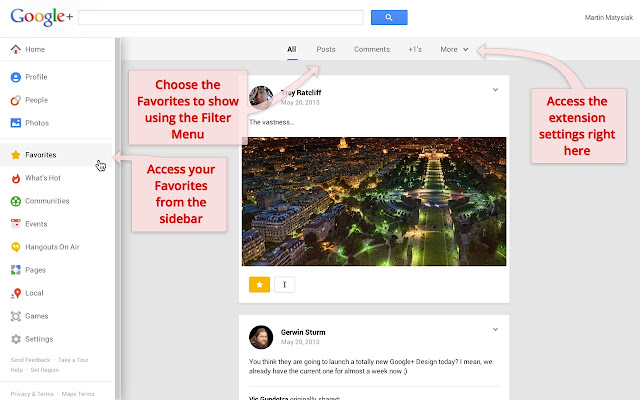
People share a lot of great content on Google+. Unfortunately, without RSS feed functionality, it can be hard to follow everything. And when one article catches your attention, there is no option to save it — unless you have created an empty Circle for that specific purpose.
Or, if you use Chrome, you can give Favorite Posts for Google+ a try. Once installed, the extension automatically adds a star button at the bottom of each post in your stream. Clicking it will allow you to save the post in a separate section of your profile. To access it, click the “Favorites” tab in the left-hand menu.

Bookmark Google+ posts in one click with this Chrome extension

Monday, 30 September 2013

Google Glass competitor ships 50K devices, takes Intel investment, hints at Apple connection


Google Glass competitor Recon, which sells the Recon Jet heads-up display and bills itself as the Google Glass for athletes and professionals, has secured an investment from Intel Capital.

In perhaps bigger news, the company announced that it has already shipped 50,000 units worldwide of its Snow model, designed for skiers.

That’s huge — likely many multiples of what Google has shipped of Glass, which is currently only available to a few thousand Glass Explorers for a fairly staggering $1,500. In a direct shot across the bow of Google Glass, the company says it offers “the world’s most advanced wearable computer.” Recon Jet sells for $599, but the company announced today it would be taking $100 off “to celebrate our Intel Capital partnership.”
Google Glass competitor ships 50K devices, takes Intel investment, hints at Apple connection
Google Glass competitor Recon, which sells the Recon Jet heads-up display and bills itself as the Google Glass for athletes and professionals, has secured an investment from Intel Capital.
In perhaps bigger news, the company announced that it has already shipped 50,000 units worldwide of its Snow model, designed for skiers.
That’s huge — likely many multiples of what Google has shipped of Glass, which is currently only available to a few thousand Glass Explorers for a fairly staggering $1,500. In a direct shot across the bow of Google Glass, the company says it offers “the world’s most advanced wearable computer.” Recon Jet sells for $599, but the company announced today it would be taking $100 off “to celebrate our Intel Capital partnership.”

Read more at https://venturebeat.com/2013/09/26/google-glass-competitor-recon-jet-ships-50k-units-gets-intel-investment-and-hints-at-apple-connection/#KFrTIotXvgsf5EAU.99

20 Tips To Use Google Search Efficiently


Download Browser Use Mobogenie to Install Browser Apps & Save Data Cost. Try Now! MoboGenie.com/Download-Browser


Millions of people use Google search every day for a variety of reasons. Students use it for school, business people use it for research, and millions more use it for entertainment. Did you know that you may not be using Google search to its full potential? Here are 20 tips and tricks to maximize your search efficiency.
Also on Lifehack: Your Guide to Learning Programming

20 Tips To Use Google Search Efficiently

Friday, 27 September 2013

Google and Raspberry Pi join forces to create Coder


Over the last few years, interest in coding (especially for the web) has led to a blossoming of resources that help average people learn how to program from scratch. Google has decided to join the fun with a new tool called Coder — along with the help of the low-cost Raspberry Pi PC.
With Coder, users can develop their own apps for the web and then host them on a miniature server located directly on the Raspberry Pi. The overall cost for the DIY programming project, using Google’s recommended materials, is under $50 — and all of the educational materials are free. After procuring a Raspberry Pi, eager students simply download information onto an SD card, plug it into the tiny computer, connect to a shared Wi-Fi and access Coder through Chrome. The whole process, according to the developers, takes just 10 minutes.

Wednesday, 25 September 2013

Google supports hashtag search, emphasizes Google+


Though a little late to the party, Google's search engine has finally embraced #hashtagmania, albeit in a totally self-serving way.
The search giant announced Wednesday that it's letting people in the US and Canada query its engine for hashtags, meaning now they can type in something like "#emmys" or "#nfl" or "americascup" on Google.com to see related status updates appear to the right of regular results.

Google supports hashtag search, emphasizes Google+

Tuesday, 24 September 2013

Quickoffice For Android & iOS Goes Free; Offers 10GB Of Extra Google Drive Storage


Smartphones these days can handle so much more than making phone calls. If you often feel the need to view or edit Microsoft Office documents on the go, then today brings exciting news; Google is now offering its cloud-based Quickoffice app for iOS and Android – which was previously being sold for $14.99 at both the App Store and Play Store – completely free of cost. The app enables you to access Office documents straight from your mobile device, and allows editing Word files, Excel spreadsheets, and PowerPoint presentations, as well as uploading these files to your Google Drive account.
The news comes after Apple made its iWork apps free for all users who are buying new Apple iDevices. Clearly a counterattack by Google against their strategy, and one with additional benefits. The app has no device-restrictions to speak of, looks pretty fantastic and comes packaged with loads of useful features including an extra 10GB worth of Google Drive space. Let’s take a closer look at the app after the break.

Quickoffice For Android & iOS Goes Free; Offers 10GB Of Extra Google Drive Storage

Tuesday, 17 September 2013

Google Analytics To Cease IE8 Compatibility By End Of 2013

Google Analytics announced today that it will not be compatible with Microsoft Internet Explorer 8 by the end of this year.
According to the announcement the company is, “Deprecating official compatibility of Google Analytics with Microsoft Internet Explorer 8 (IE8) at the end of 2013.” Google says it wants to focus its energy on new product features, and help drive adoption of web technologies that are, “in the design of Google Analytics product.”
While users will still be able to measure site traffic from IE8 browsers, Google Analytics will only support the latest versions of Chrome, Firefox, Internet Explorer 9 or higher, Safari and “other modern” browsers.
Google says it will send further reminders during the next three months, but advises companies to begin planning for the change as soon as possible.

Google Analytics To Cease IE8 Compatibility By End Of 2013

Monday, 16 September 2013

Google Coder on the Raspberry Pi – How to install


It talks of an installer, which it later transpires is only for the Mac. The instructions have since improved a bit, but initially were hopelessly confusing.
I hope the instructions will have improved even more by the time you read this, but below I’ll show you how I got it up and running.
These are instructions for a PC running Windows (7). For Mac, you can allegedly run the installer. For Linux, I expect a similar procedure will work.
Google Coder on the Raspberry Pi – How to install

Download the file

Go and download the file. It’s ~ 1 Gb and is a full system image.
https://googlecreativelab.github.io/coder/

Unzip your file

You will end up with a folder called coder_v0.4 although with time, that version number will change. Inside that folder, there’s another folder called coder_v0.4 and under that, is an SD card image file called raspi.img

Find Your disk image file

So its location will be…
wherever you unzipped the file to.../coder_v0.4/coder_v0.4/raspi.img

Flash an SD card

Flash the above .img file to an SD card (>= 4 Gb).
Instructions how to flash an SD card in Windows here

First boot

Your first boot is as a normal Raspbian boot, with screen, keyboard, ethernet. You will need to go through the normal choices screen to fully finish setting up the OS (e.g. extending the partition, etc.)
Once you reboot, your Pi should be ready to use with Google Coder.

Now Bonjour to your Windows PC

For Google Coder to work, Windows users need to install Apple’s Bonjour print services, which can be found here…
https://support.apple.com/kb/DL999
Once that’s installed, you should be good to go, as long as you have Chrome or Explorer.

Google Coder on the Raspberry Pi – How to install

Wednesday, 11 September 2013

Google+ Introduces Embedded Posts


Google+ introduced a couple of new features on Monday, including a new tool that allows bloggers and content creators to embed public Google+ posts on other sites.
Users who wish to highlight a Google+ post within a news story or on a personal blog can do so by clicking the "Embed post" tab from the drop down menu in the post's upper righthand corner. Users can then copy and paste the available line of code to embed the post, including text and photos.
Once a post is embedded on another site, it should still be fully interactive, according to a Google+ blog post, meaning users can +1 a post, comment, or follow the post's author from the embed. "We want to make it easy to expand your audience across the web," wrote Seth Sternberg, Director of Google+ Platform. Google+ was already testing this feature with specific publications like Sports Illustrated and National Geographic, but it is now available to all users.
 Google+ Introduces Embedded Posts

Saturday, 7 September 2013

Nexus 5 Mockup aufgetaucht


Das kommende Nexus 5 hält uns schon jetzt in Atem. Denn in einem Google Video ist ein unbekanntes Nexus Device aufgetaucht, von dem jeder annimmt, dass es sich um das kommende Nexus 5 handelt. Und nun sind auch noch Bilder eines LG D820 bei der FCC aufgetaucht, welches das Nexus 5 sein soll. Und anhand dieser beiden Leaks hat der User Ramon Rivas ein Mockup des kommenden Google Smartphones erstellt.
Nexus 5 Mockup aufgetaucht