Showing posts with label Chrome. Show all posts

Thursday, 11 December 2014

Chrome to Warn Users When Their Extensions Are Using Too Much Memory

chrome news  Chrome to Warn Users When Their Extensions Are Using Too Much Memory
If you ever worked in tech support (like me) or called a call center for support, you will know that “have you tried turning it off and on” is a VERY common suggestion. It is so popular that there are around it.
When it comes to Chrome/Chromebooks, there is one such question that you ask every time there is a problem. “Have you tried the Incognito Mode?” This is one of the first troubleshooting steps that you can do on Chrome. Incognito mode runs Chrome without extensions. So, Incognito mode is more like running Chrome without extensions.

Chrome to Warn Users When Their Extensions Are Using Too Much Memory

Thursday, 10 October 2013

Search by image and new Chrome for Android gestures


If you use Chrome, you might notice we’re always making small adjustments to simplify and streamline your browsing experience. Starting this week, all Chrome users will be able to search by image and Chrome for Android users get some new gestures to quickly navigate open tabs and access the menu.
  • Swipe horizontally across the top toolbar to quickly switch tabs.
  • Drag vertically down from the toolbar to enter into the tab switcher view. 
  • Drag down from the menu to open the menu and select the item you want without having to lift your finger.
Search by image and new Chrome for Android gestures 

Friday, 4 October 2013

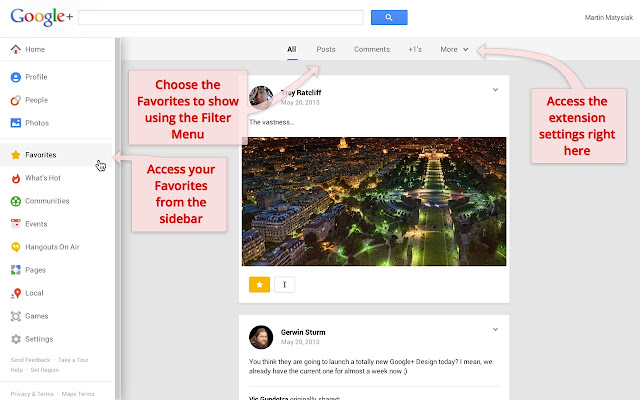
Bookmark Google+ posts in one click with this Chrome extension


People share a lot of great content on Google+. Unfortunately, without RSS feed functionality, it can be hard to follow everything. And when one article catches your attention, there is no option to save it — unless you have created an empty Circle for that specific purpose.
Or, if you use Chrome, you can give Favorite Posts for Google+ a try. Once installed, the extension automatically adds a star button at the bottom of each post in your stream. Clicking it will allow you to save the post in a separate section of your profile. To access it, click the “Favorites” tab in the left-hand menu.

Bookmark Google+ posts in one click with this Chrome extension

Thursday, 5 September 2013

Google’s browser becomes a true platform with today’s launch of Chrome Apps


Google has announced the launch of Chrome Apps today in a bid to establish the Web browser as more of a platform in itself.
The new apps are similar to what the Chrome Web Store already offers, but instead of launching in the usual looking browser, it launches sans address bar and navigations buttons, essentially making them look and feel more like desktop apps you’re used to using on PCs or Macs.
 Google’s browser becomes a true platform with today’s launch of Chrome Apps

Monday, 2 September 2013

Searching by image gets easier

Have you ever seen an image on the web and wanted to know more about it?  Well, with today’s Beta release of Chrome you can quickly discover all sorts of content related to an image by right-clicking on it, or by long pressing it on mobile devices, and selecting the option to search for it within your default search provider.


Right-click on an image to use it as a Google search

In Chrome for Android, new gestures make it even easier to get where you want to go.  Swipe horizontally across the top toolbar to quickly switch tabs (this gesture replaces swiping from the edge of the screen).  Drag vertically down from the toolbar to enter into the tab switcher view.  And drag down from the menu to open the menu and select the item you want without having to lift your finger.
 Searching by image gets easier

New Gestures in Chrome for Android


One of the most annoying features in Chrome for Android has been finally removed in the latest beta release: swiping from the edge of the screen to switch tabs. It's very easy to trigger this gesture accidentally when you open desktop sites and some sites use similar gestures (Google Image Search).

Google replaced it with a gesture that's less error-prone: "swipe horizontally across the top toolbar to quickly switch tabs". It's hard to this accidentally when browsing the web. Google added other gestures: "Drag vertically down from the toolbar to enter into the tab switcher view. And drag down from the menu to open the menu and select the item you want without having to lift your finger. Zoom into your preferred magnification on any desktop web site by double tapping on the page and swiping your finger up-down without lifting it."

GoogleOperatingSystem